
Roost Social
Good Egg LLCSocial
4.8236.00 Reviews
- Version
- 1.4.34
- Installs
- 100.00K
- Age Rating
- Teen
Screenshots
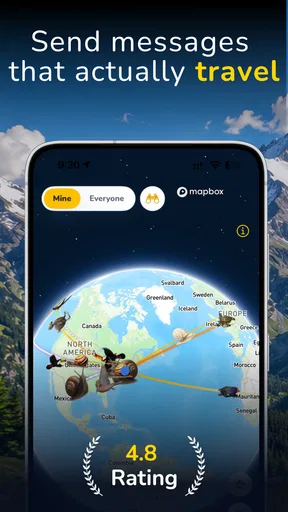
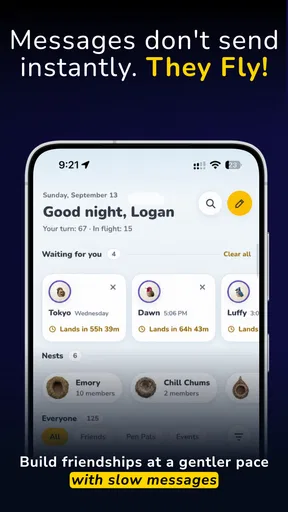

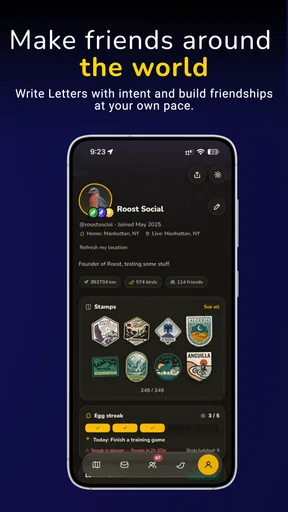
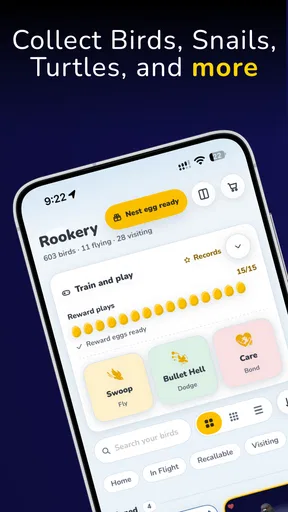
Our Review of Roost Social
 Analysis by Appyee
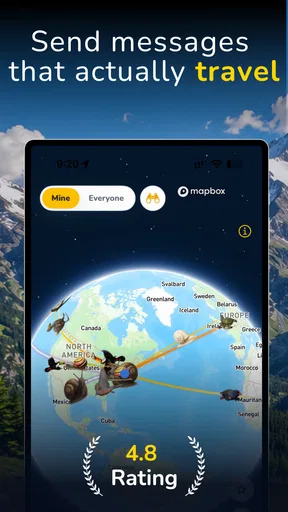
I approached Roost Social expecting a light social app with a playful theme, but its central idea is more unusual than a normal feed or chat service. Instead of asking me to keep scrolling, it gives me a pigeon to follow as it travels around the world in real time. That single choice changes the rhythm of the experience: I check in, see where the journey has reached, collect birds, and spend time training my flock rather than consuming an endless stream of posts.
That makes this a social app with a gentle game-like loop, developed by Good Egg LLC. It is free to install, aimed at Teen users, and available for devices running Android 8.0 or later. The current release is version 1.4.34, and the app has already passed 100K installs with a 4.8 average from around 5.5K ratings. Those figures suggest that the concept has found an audience, but they do not tell the whole story. The important question is whether watching a virtual pigeon cross the globe is something you will enjoy returning to after the novelty wears off.
Why the real-time pigeon journey is the heart of the app
The most distinctive capability here is not simply collecting birds or looking at a map. It is the feeling of following a continuing journey that does not depend on me being online at a particular moment. In a typical social network, the content is created by other people and quickly buried by newer updates. In Roost Social, the moving pigeon gives the app a calmer focal point. I have a reason to return, but I am not pressured to react to a constant stream of messages.
I found that this creates a surprisingly personal routine. A short visit can be enough to see the latest location and check on the flock. A longer visit can turn into time spent training birds or organizing my collection. The app therefore sits somewhere between a social space, a virtual pet experience, and a location-based travel diary. It does not try to imitate a conventional messaging app, and that is one of its strengths.
The globe-spanning journey also gives ordinary progress a sense of place. A small change in location feels more meaningful than a generic progress bar because it suggests movement through a larger world. I am not just completing an abstract task; I am keeping up with a bird that is somewhere on its route. That framing is simple, but it gives the app a memorable identity.
At the same time, I would not describe it as a replacement for a full social network. The appeal is based on shared interest and repeated check-ins rather than deep conversation. If your main reason for opening a social app is to exchange long messages, follow breaking news, or find a large community around a specific hobby, this will feel intentionally narrow. Its value comes from the journey itself.
A slower kind of social interaction
Roost Social works best when I treat it as a small shared ritual rather than a place to spend an entire evening. The pigeon gives friends or family an easy topic to revisit: where is it now, what birds have appeared, and how is the flock developing? That is a different form of social interaction from commenting on dozens of posts. It is less demanding and, for some people, more pleasant.
This slower pace is particularly useful for anyone who feels worn out by conventional feeds. There is no need to make a polished post or keep up with every conversation to feel involved. I can open the app, observe the current state of the journey, and leave without feeling that I have missed a pile of important content. The trade-off is that users looking for constant novelty may find the experience too quiet.
How the journey feels in everyday use
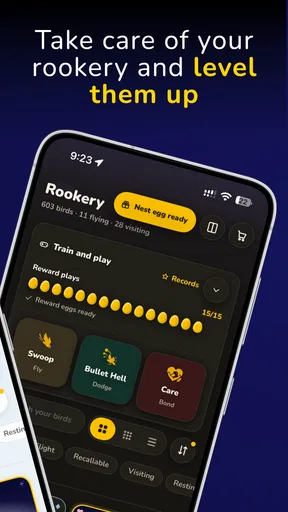
In practice, the app is easiest to understand when I divide a visit into three small actions: check the pigeon’s current progress, look at the birds I have collected, and decide whether the flock needs training. The real-time journey acts as the anchor, while collection and training provide reasons to do more than glance at a location.
The useful detail is that these activities support different moods. If I only have a moment, the travel update is enough. If I want something more interactive, I can spend time with the flock. This makes the app more flexible than a single-purpose tracker. I do not need to commit to a long session every time I open it.
I also recommend treating the journey as a habit attached to something you already do. For example, I would check it while having morning coffee, then return in the evening to see how the route has changed. That approach works better than expecting the app to provide a new major event on every visit. Its satisfaction comes from continuity, not from constant dramatic rewards.
One practical question is whether the app demands constant attention. My experience with this type of design is that it is more enjoyable when I let the journey continue in the background of my day. The point is not to stare at the same screen for hours. The point is to build a small connection with an ongoing trip and occasionally invest in the flock.
Collection changes the way I look at progress
Collecting birds gives the experience a second layer. The traveling pigeon is the obvious centerpiece, but the collection makes the app feel more like a personal archive. I am not only following one route; I am gradually building a flock that represents my time with the app.
That structure can be motivating for completion-minded users, although it also creates a possible weakness. Collection systems can make a simple app feel more complicated if I start focusing on obtaining everything instead of enjoying the journey. I found it better to view new birds as pleasant additions rather than treating the collection like a checklist that must be finished quickly.
A useful personal workflow is to decide what kind of user I want to be before spending money. Someone who enjoys casual discovery can use the free experience as a relaxed check-in. Someone who likes optimizing collections may be more tempted by optional purchases, which range from $0.99 to $49.99 per item. Because the price range is wide, I would set a personal limit in advance and avoid turning curiosity into automatic spending.
Training gives the flock a more active role
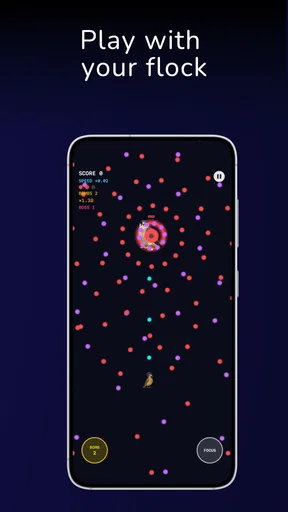
Training is important because it prevents the birds from feeling like static collectibles. It gives me a reason to return to the flock itself rather than only watching the globe journey. Even when the journey is the feature that first attracts me, training is what can make the app feel more participatory over time.
The trade-off is that training may appeal more to users who enjoy gradual development than to people who want immediate creative control. This is not a conventional action game with a large set of fast challenges. I would choose it for a measured, low-pressure routine, not for intense competition or quick bursts of excitement.
There is also a useful distinction between observing and managing. The real-time trip is mostly about following; training asks me to take responsibility for the flock. That balance is one of the app’s better design choices because it lets the experience alternate between passive curiosity and active involvement.
The best everyday scenario for Roost Social
The strongest use case I can see is for someone who wants a shared activity that does not require everyone to be available at the same time. Imagine a small group of friends who each check the pigeon during breaks in the day. One person notices the latest location in the morning, another checks during lunch, and someone else returns later to work on the flock. The app gives them a continuing subject without demanding a live group session.
That also makes it suitable for families who want something lighter than a competitive game. A parent and child could compare collected birds or discuss the journey without needing to coordinate a multiplayer match. The Teen content rating is worth keeping in mind, especially when deciding whether it fits a younger child’s device or a family routine.
I can also see it working for people who enjoy travel themes but do not want a serious travel-planning tool. The globe route creates a sense of exploration without asking me to book anything, research destinations, or maintain a detailed itinerary. It is imaginative rather than practical, and that distinction matters. I would not use it to learn geography in a structured way, but I would use it as a pleasant reminder that the virtual journey is continuing.
Another good scenario is replacing a habitual feed check with something more contained. When I feel the urge to open a social platform out of boredom, Roost Social offers a finite activity: check the route, inspect the flock, and stop. It does not automatically solve unproductive screen time, but its narrower loop can be easier to leave than a feed designed to keep going.
When a different app would be better
I would choose a standard social network instead if my priority were conversation, live reactions, or a broad range of user-created content. Roost Social’s concept is focused, and focus is both its identity and its limitation. It does not offer the same variety as a general-purpose platform.
I would also choose a traditional location or travel app if I needed accurate planning information, route details, or practical destination guidance. The pigeon’s journey is an engaging fiction-like framework for social interaction, not a substitute for navigation or travel research. Users should approach it for atmosphere and continuity rather than utility in the conventional travel sense.
For someone who prefers competitive games, the app may feel underpowered. The emphasis is on watching, collecting, and training, so the experience is better suited to patience than reflexes. Likewise, users who dislike virtual collections or optional purchases may find the progression model less appealing, even though the app itself is free to start.
Trade-offs that become clearer after regular use
The biggest trade-off is between calm continuity and immediate excitement. The real-time journey gives the app its charm, but it also means the experience may not transform dramatically from one short visit to the next. I have to enjoy small changes and gradual development. If I need a strong reward every time I open an app, the central idea may not hold my attention.
The second trade-off is between simplicity and depth. The concept is easy to understand, which makes the first session approachable. Yet the collection and training elements are what provide longer-term interest. Users who want a deep management system may wish there were more layers, while users who prefer a simple check-in may appreciate not being overwhelmed.
Optional purchases introduce another decision point. The app is free, but in-app items can cost from $0.99 to $49.99 each. I would avoid buying anything during the first few sessions and first learn whether the journey itself is enough to keep me returning. That is especially important here because the app’s appeal is emotional and habitual; an impulse purchase will not necessarily make the routine more enjoyable.
Device compatibility is relatively broad for older Android hardware because the minimum requirement is Android 8.0. Still, the experience of a real-time social app can depend on how comfortable a device is with modern interfaces and connectivity. I would keep the app updated to the current version, 1.4.34, and judge it on the phone I actually plan to use rather than assuming every older device will feel equally smooth.
Small habits that make the experience better
My first tip is to give the journey a fixed check-in time instead of opening the app randomly throughout the day. This makes progress easier to notice and reduces the chance that the app becomes another source of repetitive checking. A morning and evening routine is enough for most people who enjoy the observational side.
My second tip is to separate collection goals from training goals. If I try to chase every bird and improve the flock at the same time, the experience can become a task list. Choosing one focus for a session keeps the app relaxed and makes each visit feel more intentional.
My third tip is to use the journey as a conversation starter with a specific person rather than assuming the whole social world will matter equally. The app’s strongest social value is likely to come from a small circle that appreciates the same odd, charming premise. Sharing the experience with someone who likes collectibles or gentle virtual activities can make the route feel more meaningful.
Finally, I would keep spending optional and deliberate. The free entry point is enough to test whether I enjoy following the pigeon. If I later decide that a purchase genuinely improves my flock experience, I can make that choice with a clear budget instead of treating every new item as necessary progress.
Who gets the most from this unusual social app
Roost Social is a good fit for people who like gentle progression, virtual collections, and small routines that develop over time. It is especially appealing if you want a social experience that does not depend on constant posting. The combination of a global journey, bird collecting, and flock training gives the app a personality that is easy to recognize and difficult to confuse with a normal feed.
It is also a strong choice for a friend or family group looking for a low-pressure shared activity. The journey gives everyone something to follow, while the flock provides personal progress. That combination means participants can engage at different levels without breaking the experience for one another.
I would tell competitive players, heavy chat users, and people seeking practical travel information to look elsewhere. The app is not trying to be a complete social network, a serious game, or a navigation tool. Its success depends on whether you enjoy the specific idea of checking in on a pigeon and gradually building a flock around that journey.
After using it, my view is that the real-time journey is more than a novelty: it is the app’s pacing system. It controls how often I return, how I interpret progress, and why the collection and training features matter. When I accept that slower pace, Roost Social feels distinctive and easy to recommend to the right person. When I expect a busy feed or constant action, it feels too limited.
For me, the best way to try it is to start free, follow the route for several days, and see whether the habit feels naturally enjoyable before considering any in-app purchase. If you like unusual social concepts and want an app that gives you something small to revisit rather than something demanding your full attention, Roost Social is worth a look. Its charm is quiet, specific, and strongest when shared with people who are happy to watch the journey unfold.
Verdict
Strengths of Roost Social
- Simple interface makes browsing and posting easy for new users.
- Community-focused features encourage interaction around shared interests.
- Supports discovering content from people outside your immediate network.
- Lightweight design can feel less overwhelming than larger social platforms.
- Useful for following niche communities and keeping up with conversations.
Limitations of Roost Social
- Smaller user base may mean fewer fresh posts in some communities.
- Content quality and moderation can vary between different groups.
- Some features may feel limited compared with established social networks.
- Notifications can become distracting when several communities are active.
- Privacy details should be reviewed carefully before sharing personal information.
Similar Picks in This Category
View All
Meta Platforms, Inc.4.6

Instagram4.0

Likee-Live, Chat & Party Games
Likeme Pte. Ltd.4.4

Facebook Lite
Meta Platforms, Inc.4.5

TikTok - Videos, Shop & LIVE
TikTok Pte. Ltd.4.0

Moj: Free Short Drama & Reels
ShareChat4.1
Frequently Asked Questions
What is Roost Social, and what can I use it for?
Roost Social is a social networking app designed for connecting with other users, sharing updates, discovering content, and participating in online conversations. Its usefulness depends on the community available in your area or interest group. Before downloading, consider whether your friends or preferred communities already use it, since the experience may feel limited if there are few active users relevant to you.
Is Roost Social free to download and use?
Roost Social may be available to download at no initial cost, but users should check the current App Store or Google Play listing for the exact pricing model. Some features can require in-app purchases, subscriptions, or other paid upgrades. Review the payment details, renewal terms, and cancellation options before subscribing, especially if the app offers premium visibility, exclusive content, or additional social tools.
What personal information does Roost Social require?
As with most social networking platforms, Roost Social may request information such as an email address, username, profile photo, location, contacts, or device permissions. The exact requirements can change with updates. Before creating an account, read the privacy policy and permission prompts carefully. Avoid sharing sensitive information publicly, and review profile visibility, messaging, location, and notification settings after registration.
Is Roost Social safe for communicating with other users?
Roost Social can include standard safety tools such as blocking, reporting, privacy controls, or moderation, but users should still be cautious when interacting with strangers. Do not share passwords, financial details, private documents, or precise location information. If you encounter harassment, scams, inappropriate content, or suspicious requests, use the reporting features and stop communicating with the account involved.
Does Roost Social work on both Android and iPhone?
Availability can vary by country, operating system, and device version, so users should confirm compatibility on the official Google Play or Apple App Store page before downloading. Keep your operating system updated for better performance and security. If the app is new or community-focused, also check recent reviews for information about crashes, login problems, battery usage, and how consistently the service is maintained.
